Family Tree Maker 2019 Free Update 24.0.1

Free Update 24.0.1 for FTM 2019

If you are using Family Tree Maker 2019 and experiencing problems with Ancestry synchronization, FamilySearch integration, or TreeVault services, installing the free Family Tree Maker 2019 Update 24.0.1 may help resolve these issues.

Software MacKiev released Update 24.0.1 to improve compatibility with genealogy services and fix several problems reported by Family Tree Maker users. Many users experienced orange sync status indicators, synchronization failures, and FamilySearch connectivity issues before installing this update.

In this guide, you will learn what Update 24.0.1 includes, how to install it, system requirements, troubleshooting tips, and answers to the most common questions.

Quick Answer

Family Tree Maker 2019 Update 24.0.1 is a free software update that fixes Ancestry sync issues, improves FamilySearch connectivity, enhances TreeVault functionality, and improves overall software stability. Users running Family Tree Maker 2019 version 24.0 (Build 230) can install the update and upgrade to Version 24.0.1 (Build 252).

What Is Family Tree Maker 2019 Update 24.0.1?

Family Tree Maker 2019 Update 24.0.1 is an official maintenance update designed to improve the performance and reliability of Family Tree Maker 2019.

The update focuses on:

  • Fixing Ancestry synchronization problems
  • Improving FamilySearch integration
  • Resolving TreeVault Antenna Tree issues
  • Enhancing software stability
  • Improving data synchronization performance
  • Reducing update-related errors

This update is recommended for all Family Tree Maker 2019 users.

What Problems Does Update 24.0.1 Fix?

1. Fixes Orange Sync Status with Ancestry

Many users reported that their tree displayed an orange sync status and failed to synchronize correctly with Ancestry.

The 24.0.1 update addresses these synchronization issues and improves communication between Family Tree Maker and Ancestry.

2. Improves FamilySearch Functionality

The update enhances FamilySearch compatibility and helps users access FamilySearch features more reliably.

3. Resolves TreeVault Issues

Users experiencing problems with TreeVault Antenna Trees may benefit from installing this update.

4. General Performance Improvements

The update also includes stability improvements that help Family Tree Maker run more efficiently.

Before Installing Update 24.0.1

Before installing the update, it is highly recommended that you create a backup of your family tree.

Compact Your Tree

  1. Open Family Tree Maker 2019.
  2. Click Tools.
  3. Select Compact File.
  4. Complete the compacting process.

Create a Backup

  1. Click File.
  2. Select Backup.
  3. Include Media Files.
  4. Include Restore Sync Data.
  5. Save the backup to a secure location.

Creating a backup protects your genealogy data if anything unexpected occurs during the update process.

How to Download Family Tree Maker 2019 Update 24.0.1

To install Update 24.0.1, you must already have Family Tree Maker 2019 Version 24.0 (Build 230) installed on your computer.

You can find the update through:

  • Software MacKiev update emails
  • Family Tree Maker notification windows
  • The Help menu inside Family Tree Maker 2019
  • The official upgrade center

After locating the update, download the installer and save it to your computer.

How to Install Family Tree Maker 2019 Update 24.0.1 on Windows

Step 1: Locate the Installer

The update file is usually named:

FTM2019Updater01.exe

Step 2: Launch the Installer

Double-click the downloaded file.

Windows may display a security prompt asking for permission to continue.

Click Yes.

Step 3: Confirm Your Backup

The installer may ask whether you have backed up your family tree.

Confirm that a backup has been created before proceeding.

Step 4: Follow the Setup Wizard

Follow the on-screen instructions provided by the Family Tree Maker Setup Wizard.

Step 5: Complete Installation

Click Finish when installation is complete.

How to Verify That the Update Installed Successfully

To confirm successful installation:

  1. Open Family Tree Maker 2019.
  2. Click Help.
  3. Select About Family Tree Maker.

You should see:

Version: 24.0.1

Build Number: 252

If these values appear, the update was installed successfully.

Common Update Errors and Solutions

Error: File in Use

This error usually occurs when Family Tree Maker is still running in the background.

Solution:

  • Close Family Tree Maker completely.
  • Exit using the File menu.
  • Verify that no FTM processes remain open.
  • Run the updater again.

Update Will Not Install

Possible causes:

  • Missing administrator permissions
  • Corrupted download
  • Unsupported version

Solution:

  • Re-download the updater.
  • Run as Administrator.
  • Verify that FTM 2019 Version 24.0 (Build 230) is installed.

Benefits of Installing Update 24.0.1

Installing the update provides several advantages:

  • Improved Ancestry synchronization
  • Better FamilySearch performance
  • Enhanced TreeVault reliability
  • Fewer software errors
  • Increased application stability
  • Improved genealogy workflow

For active family historians, keeping Family Tree Maker updated helps maintain smooth access to genealogy services and research tools.

Frequently Asked Questions

Question: Does Charting Companion 7 Work After Installing Update 24.0.1?

Answer: Yes. Charting Companion 7 generally continues to function normally after the update. If issues occur, reinstalling the plugin may help.

Question: Is Family Book Creator Compatible with Update 24.0.1?

Answer: Yes. Family Book Creator remains compatible with Update 24.0.1. If errors occur, reinstall the plugin.

Question: Do I Need to Convert My Family Tree Again?

Answer: No. Family Tree Maker 2019 Version 24.0 and Version 24.0.1 use the same file format.

Question: Is This Update Free?

Answer: Yes. Update 24.0.1 is available free of charge for eligible Family Tree Maker 2019 users.

Question: Should I Back Up My Tree Before Updating?

Answer: Yes. Creating a backup before installing any Family Tree Maker update is strongly recommended.

Final Thoughts

Family Tree Maker 2019 Update 24.0.1 is an important maintenance release that improves synchronization with Ancestry, enhances FamilySearch compatibility, and resolves several common issues affecting genealogy researchers.

If you are currently experiencing sync errors, orange status indicators, TreeVault problems, or FamilySearch connectivity issues, installing the latest available update can significantly improve your experience and help keep your genealogy research running smoothly. Regular software updates are essential for maintaining compatibility, protecting your family history data, and ensuring the best possible performance from Family Tree Maker 2019.

📞 Call Family Tree Maker Support: +1-888-257-3335 

💬 Live Chat with a Family Tree Maker Expert 

What’s New in the FTM 2019 24.2 Update

FTM 2019 New Update 24.2

This article will teach about the FTM 2019 New Update 24.2 version. We will explain why it is essential for users to update the software and what is included in this fix. Users can also learn how to upgrade or update the software free of charge.

Note: In the past few months, we have received many complaints that the software needs to be synced with ancestry or getting other issues. This article is written on the 21st of February, 2023.

FTM 2019 New Update 24.2

What will this update patch fix?

Version 24.2 update will fix many issues, including login page issue with ancestry, sync issue with ancestry, FamilySearch browse issue, etc. In addition, MacKiev has added new relationship managing tools as well with this patch. So, if you have the version mentioned below, then you should update your software.

  • FTM version 24.0 – This was the first release.
  • FTM Version 24.0.1 – MacKiev released the first-ever update in November 2019, and it was built 252.
  • FTM Version 24.1 was the second update MacKiev released in August 2022.
  • FTM Version 24.2 – This is the version discussed in this article.

So, if you have FTM24.0, 24.0.1 or 24.1, you should update your software to version 24.2. There is no charge for the software.

What will it fix in the Windows operating system?

  1. Ancestry – Unknown spouse issues have been fixed with this patch. Once you update the software, the sync issue will be resolved. You will also not be getting grey hints if you install the patch.
  2. FamilySearch – The browsing issue in FamilySearch has been addressed and fixed.
  3. The lifespan in the Index is fixed. So now you can see the correct dates in the index. Also, the Tree pedigree view is fixed.
  4. Export from the chart using the intelligent filter.

What are other fixes that you get?

PDF thumbnails are now listed correctly in the media space. In addition, source citations will be evident after this update.

How do I get the update for the software?

Recently, MacKiev sent an email with a link and instructions to update the software. If you have not received the email or if you have deleted the email, then you should click the link as mentioned in the blog. Then, please click here to install the updater. You will see the image below as soon as you click the link.

ftm 2019 new update

You must fill in your information and click on verify the user. Then, please follow the on-screen instructions and download the patch for Family Tree Maker 2019.

Who should install this update?

The update is for those users who are using FTM19 version 24.0, version 24.0.1 or version 24.1. If you are using FTM17 or an older version than FTM17, then you may not need to install this update. However, you may need to upgrade to FTM19.

What would you get with this new update?

Managing relationship tool – This new tool will help you manage facts and relationships with an unknown spouse.

FTM 2019 New Update 24.2 FAQ:-

Question:- What is the charge for the version 24.2 update?

Answer:- There is no charge. MacKiev has sent an email with a link to download the updater. Similarly, you can go to the update centre to download the updater.

Question:- What if I have Family Tree Maker 2005?

Answer:- You will need to purchase a newer version of FTM. Please note that FTM19 is the latest version

Conclusion

If you want to upgrade your Family Tree Maker 2019 program, You can contact us at Family Tree Maker Support to get your issue resolved. We provide phone support 24×7. The Family Tree Maker Support Number is +1-888-257-3335. You can also use our live chat support service from our site.

How to Recover Lost Family Tree Maker 2019 Icon

Lost Family Tree Maker Icon

This blog explains if you Lost the Family Tree maker icon on your computer and how to fix it. Here, you will get information about how to Recover your lost family tree maker icon from your device.

Note:- Please know this blog is for Windows, not for Mac. 

Please follow the steps below to fix the Lost Family Tree maker icon. If you do not want to work on it and would like an expert service, please call Family Tree Maker Support to fix the lost Family Tree Maker 2019 icon. This method can be used for Family Tree Maker 2017 as well.

Check The Program List

  1. Check if your computer still has the program installed.
  2. Click on your computer’s Windows logo, located in the bottom left corner. Now search for Family Tree Maker 2017 / 2019. see the Family Tree Maker 2019 in the list, then click “open file location“.
    Family Tree Maker 2019 lost icon
  3. Right-click on the icon, click send to and then select desktop (create shortcut). Please see the image below.

    FTM2019 Lost Icon

Get a replacement copy from MacKiev.

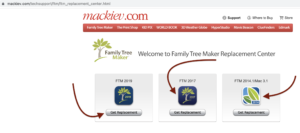
Please go to the MacKiev replacement centre and get a copy of your Family Tree Maker software. Please select the version of FTM that you need to get a copy of it.

MacKiev Replacement Center

As soon as you provide the right information to MacKiev. You will get a link to download the software. 

Follow the installation processes below to install Family Tree Maker 2019 or FTM 2017.

  1. Please click on FTM2019.exe and press install. The software will ask you if you have your Family tree files in backup mode or not in backup mode. Do you have data backed up? You will need to back it up if it is not. If your software gets locked, you can reuse this data to restore your tree since the software is already installed. You will get a popup asking if you want to remove or repair it. You will lose your software if you remove it, so be careful.
  2. Please select Repair your tree will be repaired and installed. This is the easiest way to repair your family tree maker software.

Note: After repairing the Lost Family Tree maker 2017 icon, you may need to restart the computer and then try to open the software and browse your trees. If you are still facing issues, then contact Mackiev support. You can also contact our family Tree maker support team and Call us at +1-888-257-3335 or Live Chat with our Experts.

macOS Ventura Compatibility for Family Tree Maker

macOS Ventura Compatibility for FTM

On October 24, 2022, Apple released the macOS Ventura upgrade. If you are a Mac user and want to know about macOS Ventura Compatibility for FTM  Then read this post. If you Need instant Help, then call us to our family tree maker support Experts at +1-888-299-3207.

macOS Ventura Compatibility for FTM

If you want to know the complete details about macOS Ventura Compatibility for Family Tree Maker, then you must go through this article. Here you will find the proper information depending on different editions of FTM with their compatibility status. Also, in case of any trouble, feel free to reach the FTM Support team for help.

Different Version

EditionsCompatible or not

FTM 2019

24.1Full compatible

FTM 2017

23.3Compatible with some issues
FTM Mac3.1

Compatible with some issues

FTM Mac 1

Ancestry

Not compatible

FTM Mac 2Ancestry

Not compatible

FTM Mac 3Ancestry

Not compatible

So, these are the details of the different editions of FTM with their compatibility status. Also, there are some important things to note:

  • If you are facing some troubles with FTM 2019 while exporting to FTM 2017 Or 3.1, then in such case, you need to install the free 24.1 updates instantly.
  • The export is not applicable for FTM 3.1 as only trees are allowed to open into it, so there are no patches have been planned.
  • Only trees in FTM 23.3 format are allowed to be opened, so no export works with it.

We hope this article helps you in understanding the compatibility status of different versions of FTM with macOS.

Have Any Queries?

If something is bothering you related to compatibility status or if you need more related information, then feel free to reach out to the FTM support team. The experts are always ready to assist you, and they are available 24 hours to guide you with quick solutions. So, without any other thought, reach out to the professional of FTM for any compatibility-related details.

You can also check the official website for much more related information regarding FTM. Or you can call us Family Tree Maker Support Number at +1-888-257-3335.

Family Tree Maker Live Chat