Family Tree Maker 2024 Review, Upgrade Guide, Price & New Features

Family Tree Maker 2024

Family Tree Maker 2024 is one of the latest editions of the software Mackiev which provides a number of new features, including photo fixing darkroom tools, up to 5,000 turn back time restore points, cloud based connect workspace collaboration and all in order to help the users in creating, organizing and preserve their family history with ease. Along with all these, Family Tree Maker 2024 allows users to create a detailed family tree, attach photos and historical records, synchronize their research with online genealogy services, generate professional charts and reports, and much more. Whether you are a Mac user or work on Windows, it is easily accessible to all.

What’s its price, how to upgrade it , what I need to arrange, where to buy, and other such relevant questions have led users to go through the official sources frequently to know the best advantages of it. We are focusing on supporting the same school of thought with this guide where we are aiming to cover every essential point that can help you in every possible way. To know further, stay tuned with this manual. 

New Features In Family Tree Maker 2024?

These are the latest features that users can look for within Family Tree Maker 2024. Go through all of them at once:

Turn Back Time 5000

It is an effective feature that helps to automatically save up to 5000 restore points. It helps users revert their family tree to a previous version in case they have made changes by mistake or deleted important information. With the help of this, users can gain a great amount of flexibility and peace of mind while editing the genealogy data.

Connect Workspace

It is a cloud-based collaboration feature that enables you to share your family tree with the relatives and guests whom you have invited. It helps you synchronize your tree across supported devices to make it easy to review, organize, and collaborate on genealogy research. 

FTM Connect 2.0

This is an updated mobile companion app for Family Tree Maker 2024. It helps users access their family tree, view people, photos, and events securely, and interact with the shared tree from their smartphones or tablets without making any modifications to the master tree. 

AlbumWALK

It helps you transform your family photo collection into interactive albums. With this, you can easily present images with captions, stories, and navigation features, allowing users to create an engaging way of exploring and sharing memories related to the family. 

Easy On The Eyes

This tool is very effective if you want to improve the interface of the software by increasing the size of the crucial workspace elements or enlarging the text size to make it more readable. It will help in reducing the strain on the eyes. It makes the task comfortable, especially when you are engaged in prolonged research sessions.

New Photo Darkroom Tools

Users can restore and enhance the quality of the old family photographs by using this feature. You can adjust the brightness, contrast, and sharpness, and repair the damaged and faded images. This will allow you to preserve the historical photos with improved clarity.

Resource Center

It helps you access resources where you can find information, including tutorials, articles, learning materials, and software updates. It helps users get guidance on Family Tree Maker features and genealogy research without leaving the application.

CoPilot 2024

This guides users through Family Tree Maker’s features and workflow. With the help of this, users can receive helpful tips, contextual assistance, and recommendations, which makes it easier for both new and experienced users to navigate the software.

Why Upgrade To Family Tree Maker 2024?

Do look for the Family Tree Maker 2024 Upgrade, as it will introduce you to a number of features and bring ease to your task. Have a look at the supporting points on why you should upgrade it on an early basis.

  • Enjoy seamless performance for a smoother and more responsive genealogy experience.
  • Take advantage of enhanced software stability, including bug fixes and ongoing maintenance.
  • Get access to a user-friendly interface supporting simple navigation and daily tasks.
  • Bring improvement in family tree management via updated tools to organize people, media, and research.
  • Maintain compatibility with modern Windows and macOS versions to enjoy reliable performance on new systems.
  • Get software updates and technical support from the developer.
  • Take advantage of the latest genealogy features.
  • Keep working with the latest technology designed to bring improvement in productivity.

System Requirements And Compatibility

Whether you are a Windows or Mac user, do take a look at the System Requirements for Family Tree Maker 2024 to experience seamless performance. 

Requirements Windows Mac 
Operating system Windows 10 (64-bit) or later, including Windows 11macOS Big Sur (11) or later, including macOS Sequoia 
RAM 2 GB minimum (4 GB recommended)4 GB minimum (8GB recommended)
Available disk space 900 MB950 MB 
Display resolution 1024 x 7681280 x 800
Internet connection Mainly required for activation and online services Required for activation and online services 

Compatibility:

It provides support for both Windows and Mac desktop computers.

It maintains compatibility with the latest versions of Windows 11 and macOS.

Family Tree Maker 2024 can easily open files from earlier supported versions.

FTM Connect 2.0 is available for iOS 15 or later and Android 7.0 or later to view your tree on mobile devices.

How To Install And Activate Family Tree Maker 2024

By following the steps given below, you can easily install and activate Family Tree Maker 2024. Go through all of them as per the order: 

  • First, insert the Family Tree Maker “CD” into your “Mac’s Drive”, or double-click the “.dmg file” that you have downloaded or that is located on your “FTM USB drive”.
  • Now, in the window that will appear, double-click the Family Tree Maker 2024 “Installer Icon” in order to launch the application installer.
  • Click “Continue” on the introduction screen.
  • Go through the “License Agreement” and then click the “Continue Button”.
  • Once you accept the “terms” of the agreement, click on “Agree”.
  • Choose the “Default” installation location or click “Change” install location to select a different folder. Then click “Install” to start the installation.
  • Once the installation is Complete, click “Close” in order to quit the Family Tree Maker installer.
  • Open Family Tree Maker by double-clicking on its icon in the application folder. In order to access it, click Go on the “Menu Bar” and select “Applications”. To get fast access, simply drag the family maker icon to the dock.

To Activate: 

  • First, launch “Family Tree Maker 2024” on your computer.
  • When the activation window appears, enter your “Product Key/License Key”, same as provided in your purchase email or package.
  • Ensure you are connected to the “internet” because activation requires an online connection.
  • Click “Activate” to validate your license.
  • Once you have completed the activation successfully, click on “Finish” to start using Family Tree Maker 2024.

Where To Buy Family Tree Maker 2024

To Pick Up your Copy of FTM 2024, get in touch with the official developer, Mackiev. It will help you receive a genuine license, the latest software updates, and proper access to official customer support. It will also support you in avoiding counterfeit copies or unauthorized sellers.  

How To Keep Family Tree Maker 2024 Up To Date

By keeping Family Tree Maker 2024 up to date, you can receive the latest performance improvements, bug fixes, and compatibility enhancements. Software makers recommend installing each and every new update as it becomes available to properly maintain the best experience as a user. 

You can look for the updates directly from the software or easily download them via the official update center. To learn more about the details, you can check our FTM 2024 25.0.2 Updater Guide, which gives a proper understanding of downloading, installing, and verifying the latest updates.

Troubleshooting Common Family Tree Maker 2024 Issues

Even if a number of users opt for Family Tree Maker 2024 as one of the reliable genealogy programs, there are still some issues you might occasionally encounter. Problems like missing information, slow performance, or accidental edits can easily occur, especially when you are working on a large database. Although these issues still exist, you can resolve them easily with the right approach. Look at the below-mentioned problems with their solutions.

How To Fix Slow Or Freezing Performance

If Family Tree Maker is responding slowly or freezes suddenly, it can happen due to “Large Tree Files”, “outdated software”, or “temporary system issues”. If you perform basic maintenance or keep the software updated, you can easily improve the performance. For a complete troubleshooting guide, visit the Slow and Freezes Family Tree Maker.

How To Fix Missing Family Information

A number of times, family details might appear incomplete after importing, syncing, or editing a tree. It happens due to data synchronization or display issues rather than permanent data loss. If you have noticed a missing name, our Missing Surname in FTM 2024 guide will help you identify and resolve the issue.

How To Undo Recent Changes

It’s common to make mistakes while editing a family tree. Whether you have changed the wrong records or deleted information by mistake, Family Tree Maker will provide ways to recover your work. Take a look at the recovery methods for Undoing Recent Changes in FTM 2024.

How To Manage Media, Source Images And Reports

Photos, historical records, and reports play an important role when it comes to documenting your family’s history. If you keep these files in an organized manner, it will make your tree complete and easy to navigate.  If you want to save copies of linked historical records for offline use, our Downloading Source Image in the FTM 2010-2024 guide can be your helping hand.

Conclusion!

As per our experience, Family Tree Maker 2024 is a worthwhile upgrade for all users seeking a reliable and efficient genealogy solution. It is a blend of improved performance, easy navigation, and modern tools that help users preserve their family history. Whether you are looking to purchase the software or simply need an upgrade from the previous version, this guide can be helpful. Continue your exploration with our related articles for detailed tutorials and troubleshooting assistance, all in one place. If you need any further assistance, our Family Tree Maker specialists can help with installation, backup restoration, media recovery, and Ancestry synchronization.

📞 Call Family Tree Maker Support: +1-888-257-3335

💬 Live Chat with a Family Tree Maker Expert

Get your family tree transferred safely and continue your genealogy research without interruption.

Frequently Asked Questions!

Question: Is it possible to use the existing family tree in Family Tree Maker 2024?

Answer: Yes, Family Tree Maker 2024 allows users to open and continue working with family tree files from the supported earlier versions.

Question: How to update Family Tree Maker 2024?

Answer: To update, you can easily check for updates directly in the software or download the latest updater from the official Mackiev update center.

Question: Is it compulsory to have an internet connection to use Family Tree Maker 2024?

Answer: If you want to activate, update, or use certain online services, an internet connection is mostly required. However, you can continue working on your Family Tree Maker offline after activation.

Question: Is it possible to recover the changes that I accidentally made?

Answer: Yes, there are recovery options in it that allow you to restore the previous changes or recover your work if accidental edits have occurred from your end.

How to Get the Family Tree Maker 2024 25.0.2 Updater?

FTM 2024 25.0.2 Updater

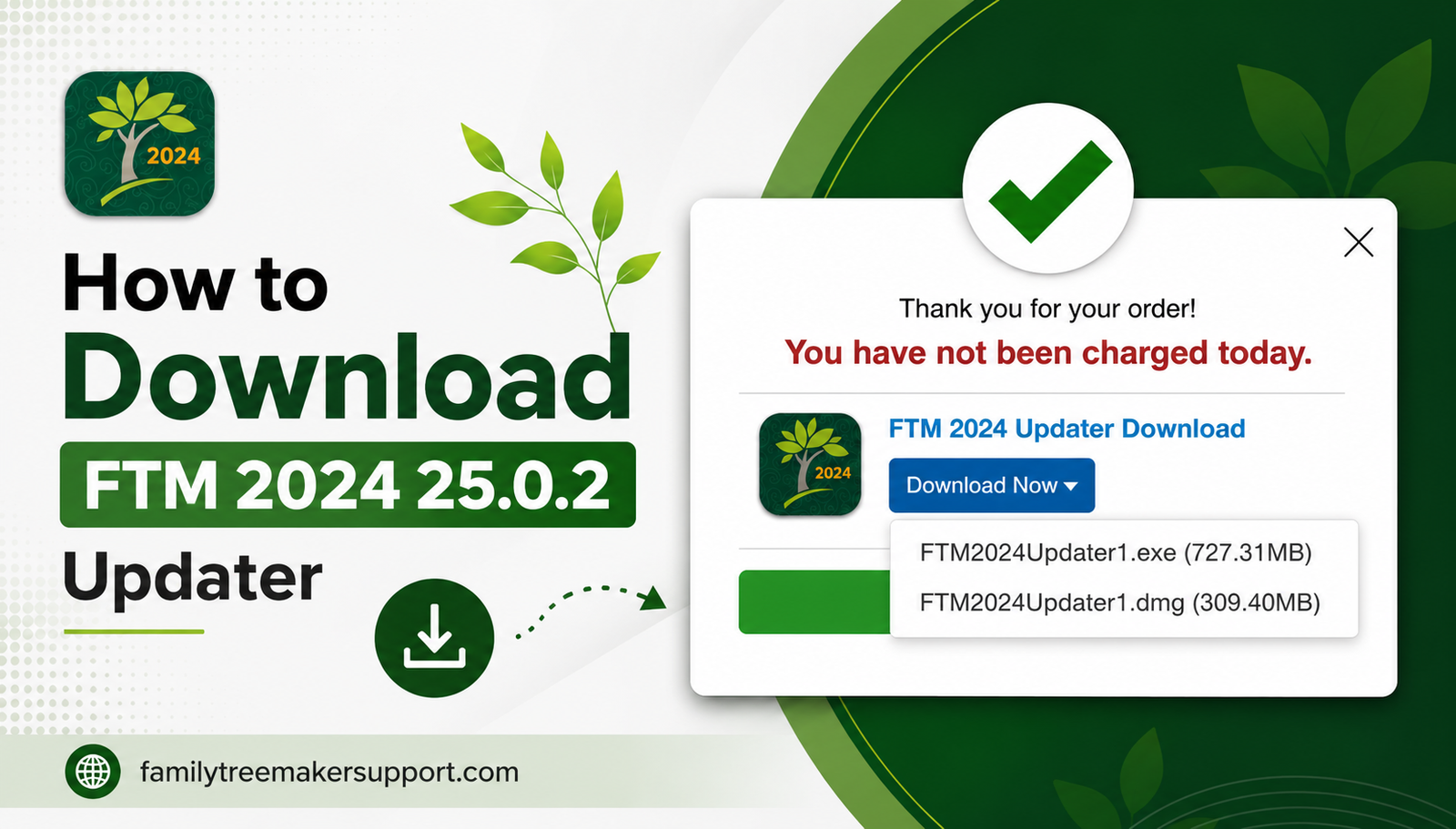
Users looking for the latest features, better performance improvements, and bug fixes can do so by keeping Family Tree Maker 2024 Upgrade. After fulfilling the eligibility for the FTM 2024 25.0.2 updater, you can obtain it via the FTM 2024 update center. The process includes a number of things, including verification of purchase, selection of your preferred delivery option, and downloading the updater for your Windows or Mac computer. With this guide, you will understand every step related to accessing and installing the FTM 2024 25.0.2 updater easily.

Procedure To Get Family Tree Maker 2024 Upgrade (25.0.2 Updater)

By following the below given steps you can get the FTM 2024 25.0.2 updater: 

  1. Initiate the process by visiting the FTM 2024 update center, which is available 24X7. Access it as per your convenience and start the updating process. Tap on the provided link to open the update center within a new browser window.
  2. On the update center first page, confirm your eligibility for it. Enter the same email address you used while purchasing Family Tree Maker 2024 to let the system verify your “Order” and “Proceed“.
  3. After the verification of your purchase, choose the way you want it to be receive: the updater. The free download option will be included automatically, while CD and USB versions are available for an additional cost.
  4. After the selection, click “Next” to proceed.
  5. Now the gift collection will appear in front of you, featuring optional products including genealogy tools and user guides. either skip these offers or add any you like before clicking on “Order Now“.
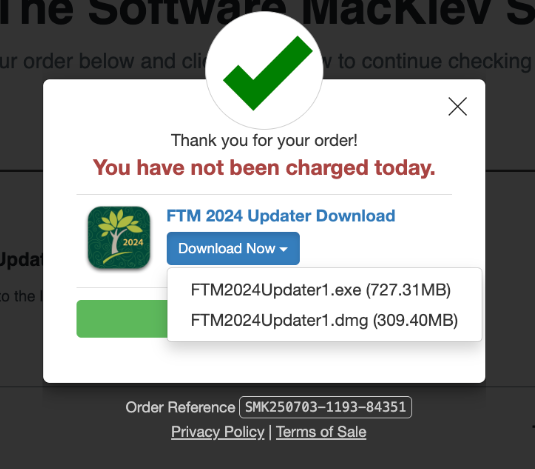
  6. Once you have completed the required information in the update center , click “Download Now” to access your Family Tree Maker download links. Choose the installer as per your operating system. You will also receive the links to your registered email.

Family Tree Maker download

Conclusion!  

After using it and witnessing the performance of Family Tree Maker 2024 Upgrade (25.0.2 updater), we will suggest you opt for a seamless performance. Once you get the updater, you can have access to the latest improvements, enhanced stability, and crucial fixes. By adhering to all the steps mentioned in this guide, you can verify your eligibility, obtain the updater, and download the correct installer with ease. After the successful update, you can carry on the management and preservation of family history by using the latest version. If any issue persists, connect with Family Tree Maker support.

📞 Call Family Tree Maker Support: +1-888-257-3335

💬 Live Chat with a Family Tree Maker Expert

Still dealing with issues related to the Family Tree Maker 2024 update? Have a word with family tree support and receive adequate support.

How to Straightening Out Relationships in Family Tree Maker 2024

Straightening Out Relationships in FTM 2024

You cannot expect perfection in the family tree at the first go. Through research, you will discover various mistakes, including duplicate individuals, incorrect relationships, and more. To Straightening Out Relationships in FTM 2024, including linking a child to the wrong parents or the irrelevance of an individual within your tree, you must know the right steps. All these issues are just a normal part of genealogy research. With Family Tree Maker 2024, you can easily correct them by merging the right individuals, removing incorrect records, updating family relationships, and more. By fixing all these issues early, you can keep your tree accurate, organized, and easier to manage.  

How to Merge Duplicate Individuals While Straightening Out Relationships in FTM 2024

As the family tree grows, you will find that the same person has been added more than once under different names or records. Instead of deleting one of the duplicate entries, merge the individuals to preserve all their facts, sources, media, and other valuable information. A family tree maker can automatically analyze your tree and identify potential duplicate individuals, making it easier to review and merge.

Tip: Before you merge individuals, keep a backup of your tree.

Procedure For Finding Duplicate Individuals

After adding a significant amount of new information or combining your tree with a family member’s, it is a better idea to check for duplicate individuals. Family Tree Maker includes a built-in tool that helps you identify potential duplicates based on matching information.​

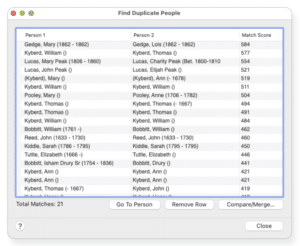
1. Open the edit menu and select Find Duplicate People. This opens the Find Duplicate People window.

Find Duplicate People

​2. The Person 1 and Person 2 columns display individuals who would be duplicates. You can click any column header to manage the list alphabetically. The match score column indicates how much the two records match. The higher the score, the more likely they represent the same person. A score of 1,000 indicates a strong match.

​3. To review or merge a pair of individuals, simply select the desired row and click on compare/merge. This will open the individual merge window, where you can easily compare the two records and proceed with the merge.

How To Merge Duplicate Individuals?

If two individual records in your family tree refer to the same person, Family Tree Maker 2024 lets you combine them into a single record. The merge process retains related facts, media, sources, and other linked data, helping to eliminate duplicate records while preserving important genealogical information.

​Adhere to the steps below to complete the merge:

​1. Open the people workspace, go to the Tree tab, and select any of the duplicate individuals from the index.

​2. Click the people drop-down arrow on the main toolbar and select Merge Two Specific Individuals. This will open the index of the individual window.

​3. Select the second duplicate individual. You can scroll through the list or use the search field to quickly locate the person by entering the last name first.

​4. Click ok to open the individual merge window. Here you will find two columns showcasing facts about each individual.

​5. Review the facts and choose how they should be merged.

​6. Set the fact as the primary record: Select the button right next to the fact you want to keep. The corresponding fact from the other individual will be merged as an alternate fact until you choose to eliminate it.

​7. Discard a fact: Click the alternate drop-down arrow and select Discard. Even if you can remove unwanted facts, it is usually recommended to keep them unless you are sure they are incorrect. If you discard a fact, you can still retain its linked sources, media items, and notes by selecting the appropriate keep checkboxes.

​8. After reviewing all the facts and preferences, click on ok to finalize the merge.

How To Detach A Child From The Wrong Parents?

If you have mistakenly added a child to the wrong parents, you can detach the child from the family without deleting them from your tree.​

  1. Go to the Tree tab on the People workspace.
  2. Make sure the correct family is the main focus of the family group view.
  3. Select the child.
  4. Click on the arrow right next to the people button on the main toolbar and choose Detach Selected Person from the attach/detach person pop-up menu.
  5. Select the checkboxes next to the father and/or mother.
  6. Click on Detach.

How To Attach A Child To A Father And Mother

Sometimes you will add an individual and their parents as separate records until you realize they are a part of the same family. While straightening out relationships in FTM 2024, you can connect them by assigning each individual to the correct parent.​

  1. In the People workspace, open the Tree tab.
  2. Choose the individual that you want to connect to a parent.
  3. Click the People menu, choose Attach/Detach Person, then select Attach Mother and Attach Father.
  4. Select the correct parent from the list, then click OK.
  5. If prompted, choose the appropriate family with which you want to establish the correct parent-child relationship.

Conclusion!

It is crucial to maintain accurate relationships to keep your family tree reliable and well organized. Whether you are removing wrong parent-child connections, duplicate individuals, or attaching a child to the correct parents, Family Tree Maker 2024 provides you with all the tools that are needed to make all these corrections without disrupting the valuable genealogical information. If you review and fix your tree regularly, it will help you prevent errors from spreading and ensure the accuracy of the research.  Do have a backup of your tree before making any changes to protect your data.

If you need any further assistance, our Family Tree Maker specialists can help with installation, backup restoration, media recovery, and Ancestry synchronization.

📞 Call Family Tree Maker Support: +1-888-257-3335

💬 Live Chat with a Family Tree Maker Expert

Get your family tree transferred safely and continue your genealogy research without interruption.

Granting Access to Contacts for FTM 2024 for Mac: Complete Setup Guide

family tree maker

In this content, we have discussed all the important details that will help you in Granting Access to Contacts for FTM 2024 for Mac. Moreover, you may have already been prompted when you first opened the new Connect Workspace in Family Tree Maker 2024. If so, you were probably asked whether you wanted to allow access to your Contacts. By accepting this request, you will have the ability to connect emails from your address book with those of the individuals in your family tree so that they can be invited to view the tree.

Quick Answer

To grant access to Contacts in Family Tree Maker 2024 for Mac:

  1. Open System Settings on your Mac.
  2. Select Privacy & Security.
  3. Click Contacts.
  4. Locate Family Tree Maker 2024 in the application list.
  5. Turn the permission toggle ON.
  6. Restart Family Tree Maker 2024.

Once enabled, you can use the Connect Workspace feature to invite family members and collaborate more effectively on your family tree.

Your contacts are strictly private and will not be shared with anyone else (including Family Tree Maker or other users) if you grant access. This feature is designed solely for your convenience and helps you quickly send invitations to family members who wish to participate in building your family tree. No one will be able to see, access, or use your contacts; this feature is intended only for your organization and convenience.

If you were unable to grant yourself access during your initial setup due to a missed prompt, an accidental click, or your choice not to grant access at that moment, you can do this at any time.

To give permission for the Contacts feature, you must go into the Privacy & Security pane of the System Settings menu, click on Contacts, and then activate Family Tree Maker 2024. To learn everything about Granting Access to Contacts for Family Tree Maker, read through this guide carefully.

Granting Access to Contacts for FTM 2024 for Mac

Expert Tip:

Our Family Tree Maker support specialists regularly assist Mac users with contact permissions, TreeVault setup, Connect Workspace configuration, and Family Tree Maker 2024 troubleshooting. The steps provided below are based on the latest macOS privacy settings used by FTM 2024.

Family Tree Maker 2024’s new Connect Workspace feature allows you to invite family members to view your Connect Workspace in FTM 2024 and provide feedback on your family tree using the Relative Hints mobile app. This information is synced back to your main Family Tree Maker desktop software in real time using TreeVault, allowing you to collaborate without risking your research data.

You can add contacts and send invitations from the Prospects/Invitations tab, as well as manage guest permissions so family members can assist with family history research and contribute to a collaborative genealogy project.

Why Should You Grant Access to Contacts for Family Tree Maker 2024?

When launching Family Tree Maker 2024 for the first time, you will have the option of granting Family Tree Maker access to your macOS Contacts.

Granting Family Tree Maker access to your Contacts allows you to:

  • Synchronize contacts from your macOS address book to Family Tree Maker 2024.
  • Quickly find and connect with family members while researching your genealogy.
  • Send invitations via email directly from the Connect Workspace.
  • Eliminate the need to manually enter email addresses.
  • Improve collaboration among relatives contributing to the family tree.
  • Save time when managing larger genealogy projects.

The purpose of granting Family Tree Maker access to your Contacts is solely for your convenience. Your Contacts remain private, secure, and protected.

Can I Trust That My Contacts Information Will Remain Private?

Yes.

Family Tree Maker 2024 does not provide access to your contact list to anyone else, including other users or the software developer.

Your contacts are stored locally on your Mac, and they are not uploaded or shared automatically.

The only time another person may receive information is when you intentionally associate a contact with a specific family tree member and send them an invitation through the Connect Workspace.

How Can You Manually Allow FTM 2024 to Access Your Contacts?

  1. Open System Settings on your Mac.
  2. Scroll down and select Privacy & Security.
  3. Select Contacts from the menu.
  4. Locate Family Tree Maker 2024 in the application list.
  5. Toggle the switch ON to allow access.

Once the switch is enabled, FTM 2024 will have permission to read your Contacts and help you connect them with individuals in your family tree.

Common Issues When Granting Contacts Access

While enabling Contacts access in Family Tree Maker 2024 for Mac, some users may experience:

  • Family Tree Maker 2024 not appearing in the Contacts list.
  • Contacts permission toggle being disabled or greyed out.
  • Changes not saving after enabling access.
  • FTM Connect Workspace unable to send invitations.
  • macOS privacy settings restricting access.

In most cases, restarting your Mac, updating Family Tree Maker 2024, or re-enabling the permission resolves the issue.

Why This Is Needed

FTM Connect Workspace

You can create a guest list directly from your Mac’s address book and send invitations through the FTM Connect Workspace feature.

Improved Collaboration

Granting access to Contacts improves collaboration within FTM Connect Workspace and eliminates the need to manually enter email addresses when inviting relatives to participate in family history research.

Your Privacy

When you allow access to Contacts, Family Tree Maker 2024 can only read the information necessary to help you send invitations. It does not share your address book with anyone else or with other Family Tree Maker users.

In Conclusion

Family Tree Maker (FTM) 2024 for Mac is a valuable tool for users building large family trees and collaborating with relatives. Allowing access to Contacts is optional; however, enabling it makes collaboration significantly easier.

The Contacts feature is designed specifically for your personal use and convenience while keeping your information secure and private. By granting access to Contacts in Family Tree Maker 2024 for Mac, you can simplify family collaboration, manage invitations more efficiently, and take full advantage of the Connect Workspace features while keeping your personal information secure.

We hope this guide has provided all the information you need about Granting Access to Contacts for FTM 2024 for Mac.

Get Instant Help!

If you have any questions about using Family Tree Maker 2024 for Mac or experience issues with contact permissions, Connect Workspace, or TreeVault, our support team is ready to help.

📞 Family Tree Maker Support: +1-888-257-3335

💬 Live Chat with a Family Tree Maker Expert

Frequently Asked Questions

Q1. What is the purpose of Family Tree Maker 2024 requesting access to my contact list?

A. Family Tree Maker uses macOS Contacts to help users quickly connect individuals within their family tree and send invitations through the Connect Workspace feature.

Q2. Is it safe to give Family Tree Maker access to your contact list?

A. Yes. Family Tree Maker only has access to your local Contacts on your Mac. Your information is not shared with Ancestry, MacKiev, or other online services.

Q3. If I deny Family Tree Maker access to my contacts, will it still function properly?

A. Yes. Family Tree Maker 2024 will continue to work normally. However, contact-related features and invitation tools may not be available.

Q4. Can I use Family Tree Maker and not allow access to my contact list?

A. Yes. You can still edit your family tree, sync with Ancestry, and use the software without granting Contacts access.

Q5. How do I enable Contacts access if I previously denied it?

A. Open System Settings > Privacy & Security > Contacts and manually enable Family Tree Maker 2024 from the application list.

How to Pre-Order FTM 2024

Pre-order ftm2024

After a long wait, MacKiev has upgraded FTM2019 to Family Tree Maker 2024. In this topic, I will explain how you can pre-order FTM2024 from the MacKiev website. Please do not go to any other website to order it. MacKive has sent emails to all his customers to pre-order FTM2024. If you have not received or changed your email, click the link to pre-order it.

Pre-order FTM2024

Please follow the steps below.  Once you click the link, you will get three options. Please check the image below.

Pre-order ftm 2024


Please select the download option to get a link to download the software. As soon as FTM2024 is released, you will get an email to download the software. You can select the second option if you want to get DVD + Link (We do not suggest selecting this option as most new computers do not have a DVD reader.) The third option will provide you with USB + Download. All these three options will give you a download link. Please note that MacKiev is not sending the link right now. You will get the link as soon as FTM2024 is released.

Who can pre-order Family Tree Maker 2024?

Anyone can pre-order it. So, let’s say you want to start using FTM to store your genealogy data and are new to FTM. You can still pre-order it. If you pre-order it now, you will pay only $29.97 + Tax. From a new user to an existing user, you can pre-order FTM24.

What is new in FTM 2024?

A few new features have been added, and existing features have been upgraded. I am going to list them for you.

  1. Connect workspace
  2. FTM Connect 2.0
  3. Easy on the eyes
  4. New Photo Darkroom Tools
  5. Album Walk
  6. Resource Center
  7. Co-pilot 2024

We will make another blog with a detailed explanation of the FTM2024 features mentioned above in another blog.

FTM 2024 FAQ

Question:- How much does a family tree maker cost?
Answer:- If you buy right now, FTM2019, you will have to pay $79.97 + Tax. If you want to, you can wait till MacKiev releases the new Family Tree Maker 2024 edition. If you pre-order it now, you must pay $29 + Tax.

Question:- How do I make a free Family Tree Maker online?
Answer:-
Few companies provide free software to create family trees. Family Tree Maker is the software owned by MacKiev, and MacKiev does not have a free or trial edition for users.

Conclusion:-

If you are a Family Tree Maker user, I suggest you pre-order it so you can get a 60% discount. It is better to use updated software instead of an older version. An older version of any software is not as stable as a newer version can be. Please contact us if you need any help to pre-order FTM2024.

If you Need any Help, you can Visit our Website or Call Our Family Tree Maker Support Number +1-888-257-3335; you can Live Chat with our FTM Experts.