The following article discusses the steps to download the free FTM 2024 25.0.2 Updater. You may have questions about this version. Please see the FAQ article that addresses the most common inquiries for this update.
Learning How to get the FTM 2024 25.0.2 Updater
This FTM 2024 version 25.0.2 update is a free and significant update provided by Software MacKiev. It enhances the stability of the application and adds new statistical capabilities to the “Connect” workspace so users can track their DNA/fact-checking statistics. Users should access the update via the Help menu in FTM 2024 and select “Check for Updates” or go to the FTM 2024 Update Centre on the MacKiev website, verify that they own a copy of FTM 2024 and download the installer. Before downloading this update, please verify that you are currently using FTM 2024, sync your family tree and create a manual backup of your FTM files for your protection.
Getting TheUpdater: Family Tree Maker 2024 ‘Download’
Through this article, you will learn how to acquire the FTM 2024 update for free. You may find answers to many Frequently Asked Questions regarding the 25.0.2 update by clicking here.
The following are the Instructions on how to get the Family Tree Maker 2024 download on your device:
- To access the Update Centre, go to the website at any time of day or night. The Update Centre is open 24/7/365, allowing you to download the FTM updater at your convenience. Click here to open the Update Centre in a separate browser window.
- The Update Centre will verify your eligibility on the first screen of the download process and provide any additional information needed.
TIP: Ensure that you are signing into the FTM Update Centre with the same email address you used to order Family Tree Maker when you place your order.
- Selecting whether to download, receive a CD or use a USB drive. Downloading the software or ordering a CD or USB drive is available as a free download or with an additional shipping fee. Press NEXT to continue.
- Learn about other items in the Gift Collection. Although you need to be aware that all items in this collection are completely optional, any items you purchase will help to provide free updates. When you reach the conclusion of the Gift Collection, there will be a page for the Checkout, where you will see a button labelled Order Now.
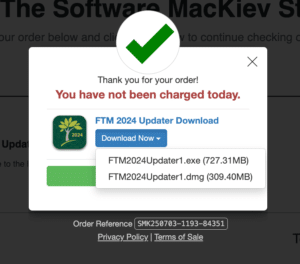
- Once you have submitted your order form at the Update Centre, you will receive a prompt via a pop-up window with the button labelled Download Now. By clicking Download Now, you will be redirected to download the updates strictly for Mac and Windows. After pressing Download Now, you will be prompted to select either the .exe file (for Windows users) or the .dmg file (for Mac users), and the download for whichever operating system you have will start.

TIP: If you find that the downloading is going slowly, then you should choose to check back later when there are fewer users downloading.
Need Support?
Once you follow the above instructions, you should definitely know everything regarding FTM 2024 25.0.2 Updater. Nevertheless, if you come across any queries related to Family Tree Maker 2024, then you can call the Family Tree Maker support number at +1-888-257-3335. You could also feel free to reach out to our experts at any time using the Live Chat Support.