
In this content, we have discussed all the important details that will help you in Granting Access to Contacts for FTM. Moreover, you may have already been prompted when you first opened the new Connect Workspace in Family Tree Maker 2024. If so, you were probably asked if you wanted to be allowed to access your own Contacts. By accepting this request, you will have the ability to connect emails from your address book with those of the individuals in your family tree so that they can be invited to view the tree.
Your contacts are strictly private and will not be share with anyone else (including Family Tree Maker or other users) if you allow yourself access. This is a feature intend only for your own use, which will help you quickly and easily send out invitations to family members who want to help you build your family tree. No one will be able to see, access, or use your contacts; this is strictly for your organization and convenience.
If you were unable to grant yourself access during your initial setup due to a missed prompt, an accidental click, or your choice not to grant access at that moment, you can do this at any time.
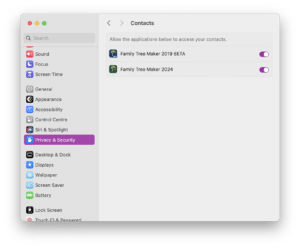
To give you permission to use the Contacts feature, you must go into the Privacy & Security pane of the System Settings menu, click on Contacts, and then activate the Family Tree Maker 2024 account. To be able to learn everything about Granting Access to Contacts for Family Tree Maker, you must read through this thoroughly to get the best access.
Granting Access to Contacts for FTM 2024 for Mac
“Family Tree Maker 2024’s new Connect Workspace feature allows you to invite family members to view your Connect workspace in FTM 2024 and to provide feedback on your family tree using the mobile app for Relative Hints. This information is sync back to your main Family Tree Maker desktop software in real-time using TreeVault, so you can work together without fear of losing any of your hard work. You will add contacts and send invitations from the Prospects/Invitations tab, as well as manage the permissions of your guests so that they can help you with your family history research and create a collaborative research centre around your family tree.”
Why Should You Grant Access to Contacts for Family Tree Maker 2024?
When launching Family Tree Maker 2024 for the first time, you will have the option of granting Family Tree Maker access to your macOS address book (Contacts). Granting Family Tree Maker access to your Contacts allows you to:
- Synchronize contacts from your macOS address book to Family Tree Maker 2024, making it easier for you to find and connect with family members while researching your genealogy.
- Quickly send invitations via email to your family members, giving them an immediate way to view and contribute to your tree on Family Tree Maker.
- Eliminate the need to manually enter email addresses for every invite you send.
The purpose of granting Family Tree Maker access to your Contacts is solely for your convenience. Your Contacts will remain private, secure, and protected.
Can I Trust That My Contacts’ information Will Remain Private?
Yes! Family Tree Maker 2024 does not provide access to any portion of your contact list to anyone else (including other users) or to the company that makes it.
Your contacts are stored locally, so you can manage them directly through the app on your Mac, and they will not be uploaded to any other location.
The only time any other user would have access to your contacts is if you have designated that they be associated with particular members of your family tree, which allows for the possibility of sharing emails and other collaborative activities.
How can you manually allow FTM 2024 to Access Your Contacts?
- Open the system preferences in macOS.
- Scroll down and select “Privacy & Security.”

- Select “Contacts” from the menu on the left side.
- In the right-hand window, find “Family Tree Maker 2024”.
- Toggle the button ON to allow access. Once you’ve toggled the switch ON, FTM 2024 will have permission to read the user’s contacts and allow them to connect them to any person in the user’s tree.

Why This Is Needed
- FTM Connect: You can create a guest list from your computer’s address book using this feature to send invitations to your tree through the FTM Connect app.
- Your Privacy: When you allow access to the FTM 2024 program, it will only allow FTM 2024 to see your contacts to send invitations for their own personal use. It will not share your address book with anyone else or with any other users of FTM.
In Conclusion
Family Tree Maker (FTM) 2024 for Mac is a very useful tool when building a large family tree and allowing family members to help with that project. Allowing family members to access your tree is optional; however, we recommend you do so. You will also want to ensure that your private information remains safe and secure; our Contact tool is design specifically for your personal use, and we want to make sure you are able to utilize it fully. Enabling Contacts is the best way for you to maximize the value of FTM 2024. Furthermore, we truly hope that now you have all the information on ‘Granting Access to Contacts for FTM 2024 for Mac’.
Get Instant Help!
If you have any further questions about using FTM 2024 for Mac or if you are having trouble with FTM 2024 for Mac, we would be happy to help. You can reach out to our dedicated staff via our Support Live Chat or call us directly at the Family Tree Maker Support Number +1-888-257-3335.
FAQs:
A.When starting up Family Tree Maker 2024 on a Mac, macOS prompts to allow access to the contacts. The reason for this prompt is that Family Tree Maker uses macOS’s Contacts app to easily fill in or reference, duplicate names or relationships when linking individual people together on your family tree.
A. Yes, Family Tree Maker will only have read access to your Mac’s Contact list. For reference, when creating your family tree, you are not able to upload or share your contact information with Ancestry, MacKiev, or other online services. This means that all of the data is store securely on your Mac.
A. Family Tree Maker 2024 will continue to work without granting access to your contact list. However, you will not have access to the features that require contacts from the macOS contact app. If you decide to grant access later, that is always an option.
A. Yes, Family Tree Maker 2024 will allow full functionality and features without granting access to contacts. Denying this access will not affect the ability to sync with Ancestry, edit your family tree, or use any of Family Tree Maker’s main functions.