
Choosing a Status for a Couple’s Relationship is an important step in keeping your family tree accurate and well organized in Family Tree Maker. Whether a couple is married, divorced, separated, or deceased, selecting the correct relationship status ensures that charts, reports, and family connections are displayed correctly. By maintaining accurate relationship records, you can avoid confusion, improve genealogy research, and preserve reliable family history for future generations. This guide explains how to choose a Status for a Couple’s Relationship in Family Tree Maker 2024 on both Windows and Mac, along with useful tips and best practices.
How To Choose a Status for a Couple’s Relationship?
Choosing an appropriate relationship status for a couple is essential when documenting family history. This helps organize your family tree by bringing clarity and accuracy and ensuring relationships are represented correctly across generations. Whether the couple is married, divorced, separated, or in another type of relationship, choosing the correct status provides you with a clear picture of their family connections. It also helps maintain a consistent record, reduce confusion, and make your family tree easier to understand, manage, and secure for upcoming generations. For further information on how to choose a Status for a Couple’s Relationship in detail, along with other important factors, stay tuned to learn more.
Steps to Choose a Couple’s Relationship Status
Choosing the correct relationship status should always be based on reliable sources such as marriage records, legal documents, family records, or verified personal information. Accurate records help keep your family tree organized and trustworthy. If you identify the relationship status, it helps you improve the quality of your genealogy records and keep your family tree easier to understand.
- Open the tree tab on the people workspace and select the appropriate couple.
- Click on the Person tab, then click on the Relationships button.
- Select the spouse’s name. Within the editing panel, choose a status from the status pop-up menu.
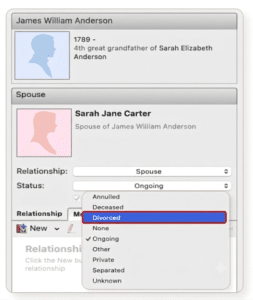
4. In FTM 2024, you can enable a setting called “Upon death of either spouse, change relationship status to Deceased” option in general preferences. Once it is enabled, Family Tree Maker automatically changes a couple’s relationship status to “deceased” when you enter a death date for either spouse.
To enable it on a Mac computer
- Click on the Family Tree Maker 2024 menu on the upper panel of your Mac.
- Select settings.
- Select the checkbox next to the option “upon death of either spouse”.
To enable it on a Windows PC
- Click on Tools.
- Select “Options”> General tab and select the checkbox next to the option “upon death of either spouse”.
Advantages Of Choosing A Status For A Couple’s Relationship?
With the selection of the right relationship status, it becomes possible to bring accuracy to family records and help organize complex family connections.
- After entering a spouse’s death date, Family Tree Maker automatically changes the relationship status to Deceased (if this option is enabled), instead of leaving it marked as an ongoing marriage.
- Once you define relationships correctly, the software can generate the correct pedigree and descendant trees without defaulting to the wrong spouse.
- Choosing the correct relationship status helps organize complex family relationships and improves parent preferences and display settings.
- Supports managing multiple family connections and verifies relationship types using the Manage Relationship tool.
Effective Tips To Maintain The Accuracy Of Relationship Records
It is essential to keep the relationship records accurate to build a reliable and well-organized family tree. Minor mistakes can easily lead to confusion in family connections, so it is very important to adhere to best practices for record-keeping.
- Extract the information from reliable official documents.
- Updating records is essential.
- Maintain a record of marriage and divorce dates when possible.
- Review your family tree on a regular basis.
- Have a supporting source attached to each record.
- Maintain consistency with a relationship status.
Key Mistakes To Avoid
While choosing a status for a couple’s relationship, it is important to avoid the mistakes given below.
- Selecting A Wrong Relationship Status
A wrong choice of status can lead to confusion in family connections and make the records inaccurate.
- Avoid Updating After Major Life Events
If you do not update the status after events such as marriage, death, and divorce, your family tree will remain outdated.
- Assigning Incorrect Relationship Status
Relying on unsupported options can cause errors or inconsistent data.
- Lack Of Verification Of Records
Updating without verifying records can result in wrong information.
- Keeping The Status Blank
An empty status can lead to gaps in the family tree and make relationships unclear.
Conclusion!
Maintaining accurate relationship statuses is essential for keeping your Family Tree Maker records organized and reliable. Regularly reviewing relationship details and updating records after major life events helps preserve an accurate family history for future generations.
FAQ!
Answer: The available relationship statuses totally depend on the software you are using. Some of the common options include married, separated, divorced, deceased, and ongoing.
Answer: It can lead to inaccuracies in family records, confusion in family connections, and incorrect relationship statuses in your family tree.
Answer: Yes, it allows you to edit relationship details at any time, keeping it easy to keep your records accurate and up to date.
Answer: Keeping the relationship records up to date keeps your family tree accurate, organized, and easy to understand. It also helps prevent errors and preserves reliable genealogical information.
📞 Call Family Tree Maker Support: +1-888-257-3335
💬 Live Chat with a Family Tree Maker Expert
Need help updating relationship statuses or managing your Family Tree Maker file? Our specialists can assist with installation, backup restoration, media recovery, and Ancestry synchronization.
Andy Smith is a genealogy researcher and family history specialist with over 10 years of experience in family tree research, ancestry records, and genealogy software. He specializes in Family Tree Maker, Legacy Family Tree, Ancestry, FamilySearch, and DNA-based family history research, helping users preserve and organize their family heritage.